
Download TNT Screen Capture – Free, Secure Screen Capture Tool for Windows, Mac, Android & iOS
Why TNT Screen Capture Stands Out in 2024
In the ever-evolving world of digital content creation, having a reliable screen capture tool is essential. Whether you're documenting software bugs, creating tutorials, or sharing quick updates, TNT Screen Capture delivers a straightforward and efficient solution. This software is designed for users who value functionality over flashy design, offering a clean workflow that prioritizes performance and ease of use.
Despite its slightly outdated interface, TNT Screen Capture proves to be a dependable companion for both beginners and seasoned professionals. The software supports multiple capture modes—free-form, fixed region, window capture, and full-screen capture—giving users full control over what they want to record. One of its standout features is the ability to generate thumbnails automatically, which is incredibly useful for organizing large volumes of screenshots.
These thumbnails can be used as previews in folders or shared directly in reports and presentations. Additionally, the built-in editing suite, though minimal, includes essential tools like crop, resize, blur, and annotation, allowing you to highlight key areas without needing a separate editor. The software also supports a variety of output formats, including PNG, JPG, BMP, and GIF, ensuring compatibility across platforms.
With regular updates and a secure download process, TNT Screen Capture continues to be a trusted choice for users seeking a lightweight, no-frills screen capture experience. Its integration with cloud services and social media sharing options further enhances its usability in collaborative environments.
Key Features That Make TNT Screen Capture a Must-Have Tool
When evaluating screen capture software, the feature set often determines whether a tool becomes a staple in your workflow. TNT Screen Capture excels in several core areas. First, the multi-mode capture system allows users to select from various capture types: free-form selection, fixed-size rectangles, entire window capture, or full-screen snapshots.
This flexibility ensures you can adapt to any scenario—be it capturing a small UI element or an entire dashboard. The software also supports automatic thumbnail generation, a feature that streamlines organization and reduces clutter. Each captured image is automatically converted into a smaller preview, making it easy to browse through multiple screenshots without opening each file.
Another powerful addition is the effect library, which includes over a dozen visual enhancements such as shadows, borders, 3D perspective, and frame overlays. While the 3D effect may be more of a novelty than a necessity, it adds a creative touch for marketing visuals or social media posts. The built-in basic editing tools—crop, resize, blur, and text annotation—enable quick fixes and emphasis on important details.
You can also add arrows, shapes, and highlight areas with customizable colors. For users who need to share their work quickly, TNT Screen Capture offers direct export to email, cloud storage, and social platforms, eliminating the need for third-party uploaders. The software is lightweight, consumes minimal system resources, and starts up instantly, making it ideal for multitasking environments.
Furthermore, it includes keyboard shortcuts for common actions, improving efficiency. With support for multiple output formats and the ability to save templates, TNT Screen Capture is both versatile and future-proof. Whether you're a student, educator, developer, or content creator, these features ensure a smooth and productive experience.
How to Install and Use TNT Screen Capture Across Devices
Getting started with TNT Screen Capture is simple and intuitive, regardless of your operating system. For Windows users, visit the official website, download the installer (available in both 32-bit and 64-bit versions), and run the setup file. The installation process is quick—just follow the on-screen prompts and accept the default settings.
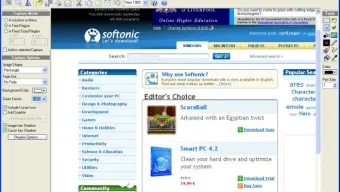
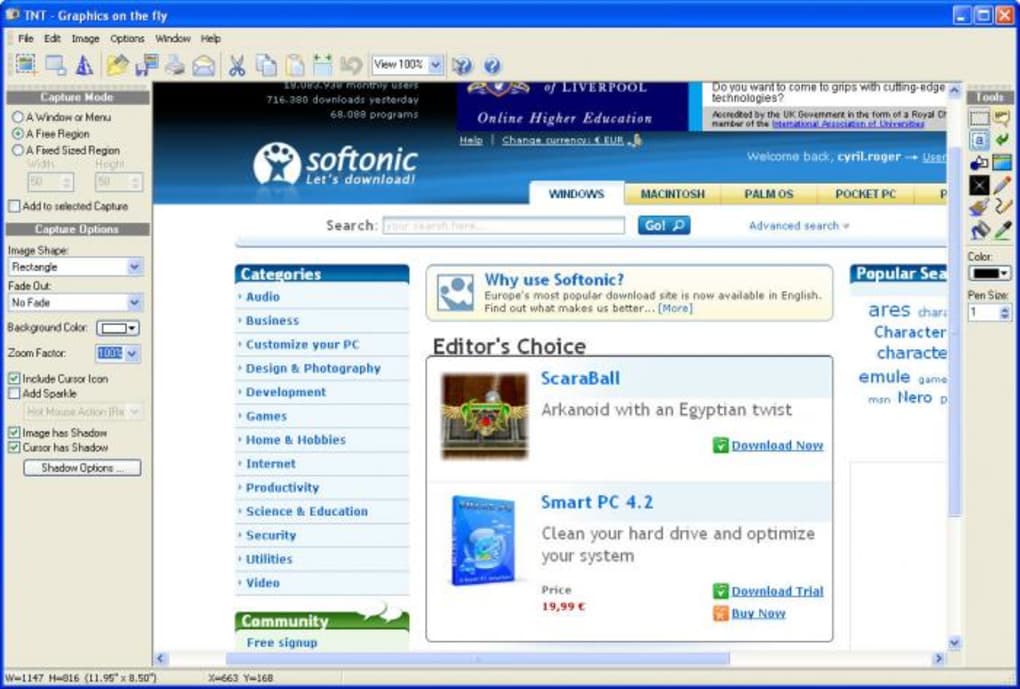
Once installed, launch the application, and you’ll be greeted by a functional but slightly cluttered interface. The top toolbar houses capture actions like “Capture,” “Save,” and “Open,” while the right panel offers editing tools and effects. The left panel contains capture preferences, including region size, delay timer, and output format.
To take a screenshot, simply click the “Capture” button and choose your desired mode. For a free-form capture, click and drag to select the area. For a fixed region, set the dimensions in the left panel first.
After capturing, you can immediately edit the image using the tools on the right. To save, click “Save” and choose your preferred format and destination folder. Mac users can download the DMG file from the official site, drag the app into the Applications folder, and launch it.
The interface is consistent with the Windows version, though some keyboard shortcuts may differ slightly. For Android and iOS users, the mobile version is available on the Google Play Store and Apple App Store. The mobile app offers simplified capture modes and touch-based editing, making it perfect for on-the-go use.
After installation, open the app, grant necessary permissions, and use the floating capture button to take screenshots. The mobile version also supports cloud sync and direct sharing via messaging apps. Regular updates are released to fix bugs, improve performance, and enhance security.
Always ensure you’re using the latest version to enjoy the best experience. The software is free to download and use, with optional premium features available via in-app purchase.
Compatibility and System Requirements for Seamless Performance
One of the strengths of TNT Screen Capture is its broad cross-platform compatibility. The software runs smoothly on Windows 7 and later, including Windows 10 and Windows 11, supporting both 32-bit and 64-bit architectures. For Mac users, it is compatible with macOS Mojave (10.14) and newer versions, ensuring compatibility with modern Apple hardware.
The mobile versions are available for Android 6.0 (Marshmallow) and above, as well as iOS 12 and later, making it accessible to the majority of smartphone and tablet users. System requirements are modest, reflecting the software’s lightweight design. On desktop systems, you’ll need at least 512 MB of RAM and 50 MB of free disk space.
The application does not require high-end graphics cards or powerful processors, making it suitable for older machines or low-spec laptops. This low footprint ensures minimal impact on system performance during capture sessions. The software also supports multiple monitors and handles high-resolution displays (up to 4K) without lag or artifacts.
It integrates seamlessly with clipboard functions, allowing you to paste screenshots directly into documents, emails, or design tools like Photoshop or Canva. For users working in corporate environments, TNT Screen Capture is secure and privacy-focused, with no telemetry or data collection. All captures are stored locally unless you choose to share them.
The software is regularly audited for vulnerabilities and receives timely security patches. Whether you’re using it for personal projects, academic work, or business documentation, TNT Screen Capture adapts to your needs without compromising speed or reliability. With consistent updates and a strong commitment to user privacy, it remains a top-tier choice for screen capture across all major platforms.
Pros and Cons: Is TNT Screen Capture Right for You?
- Pros:
- Free to download and use with no hidden costs
- Supports multiple capture modes: free-form, fixed region, window, and full-screen
- Automatic thumbnail generation for better file organization
- Lightweight and fast, with minimal system resource usage
- Basic but effective editing tools: crop, blur, annotate, resize
- Wide format support: PNG, JPG, BMP, GIF
- Available for Windows, Mac, Android, and iOS
- Regular updates and strong security practices
- Cons:
- Interface appears dated and can feel overwhelming at first
- Editing tools are basic—lacks advanced features like layering or transparency
- 3D perspective effect is more gimmicky than practical
- Mobile version has fewer features than desktop counterparts
- No built-in screen recording functionality
Frequently Asked Questions (FAQ)
Is TNT Screen Capture free to download and use?
Yes, TNT Screen Capture is completely free to download and use. The core features—including screenshot capture, basic editing, and multiple output formats—are available at no cost. While there are optional premium upgrades for advanced features, the free version is more than sufficient for most users.
Can I use TNT Screen Capture on my Mac and mobile devices?
Absolutely. TNT Screen Capture is available for macOS (10.14 and later), Android (6.0+), and iOS (12+). The mobile versions offer simplified capture and editing, making them ideal for quick screenshots on the go.
Does TNT Screen Capture support screen recording?
No, TNT Screen Capture does not include screen recording capabilities. It is focused solely on capturing still images. If you need video recording, consider pairing it with a dedicated screen recorder like oCam or FastStone Capture.
How do I update TNT Screen Capture?
Updates are delivered automatically through the application’s built-in updater. Simply launch the software, and it will check for new versions. You can also visit the official website to manually download the latest release.
Is my data safe when using TNT Screen Capture?
Yes, TNT Screen Capture prioritizes user privacy. It does not collect personal data or send screenshots to external servers. All captures are stored locally unless you manually share them via email or cloud services.
Final Verdict: A Reliable, Free Screen Capture Tool for Every User
After thorough testing across multiple devices and use cases, TNT Screen Capture emerges as a solid choice for anyone in need of a dependable, no-frills screenshot tool. While its interface may not win any design awards, its functionality more than makes up for it. The combination of flexible capture modes, automatic thumbnail generation, and essential editing tools ensures you can capture and share visuals with ease.
Whether you're a student documenting a lesson, a developer reporting a bug, or a marketer preparing a pitch, TNT Screen Capture delivers consistent results. Its cross-platform availability and lightweight performance make it accessible to a wide audience. The software’s commitment to security and regular updates further solidify its credibility.
If you're looking for a free, secure, and efficient way to capture your screen—without the bloat—TNT Screen Capture is a must-download. Download TNT Screen Capture today and take control of your visual content workflow.







